Here is our groups Design Document.
Clicky
Tuesday, September 11, 2007

Tuesday, September 4, 2007
Project 2 Finished!
Side Scrolling
Final .swf
With the 11th hour fast approaching, I went and saw Dan for advice on how to fix the hit test issue. Dan worked out that the problem was the code I had written simply told the main movie clip to go to the hit movie clip, and as a result, for as long as the hit test was true, the main movie was continuously being redirected to the start of this hit movie clip, rather than being directed to it once, and then have it play. Dan showed me how to fix this by setting up a counter which, when the hit test was triggered, would start increasing until it reached 40 (the length of the hit movie clip) and the revert back to zero, and this counter was used to directly cycle through the frames of the hit movie clip when activated. Simple eh? I then made it so this would only happen if the duck key was not being pressed, a little bit more tweaking to do with the area of the hit test (so it is only activated when the block comes in contact with the monkeys head, rather than the start of the monkeys movie clip, which is back by his tail) and it worked almost perfectly (if the monkey is walking backwards when he gets hit there are issues, but i didn't really have time left to fix this)
I also added a basic preloader as i noticed the size was getting pretty big, and when the .swf loaded in the browser, it do so a layer at a time, which looked pretty awful.
Apart from a few changes not really worth mentioning that pretty much wraps up this environment. I'm really happy with how it worked out. It would of been cool to add some sound effects like footsteps and impact noises but time didnt allow it.
Isometric Environment
Final.swf
The isometric environment was a bit of a mixed bag to be honest, after not reading the brief properly initially (My own fault) and as a result only starting it about half way through the assignment, and then with less than a week to go working out that my current approach was pretty unfeasible, and having to basically start from scratch, this environment didn't get as much time as the side scrolling, isn't nearly as polished. I still couldn't get the character walk animation to stop playing once the key is no longer being pressed, and the scrolling isn't perfect. Although i feel I have managed to modify it pretty heavily form the original tutorial i based it on.
Overall I really enjoyed this assignment though, and learned heaps.
Final .swf
With the 11th hour fast approaching, I went and saw Dan for advice on how to fix the hit test issue. Dan worked out that the problem was the code I had written simply told the main movie clip to go to the hit movie clip, and as a result, for as long as the hit test was true, the main movie was continuously being redirected to the start of this hit movie clip, rather than being directed to it once, and then have it play. Dan showed me how to fix this by setting up a counter which, when the hit test was triggered, would start increasing until it reached 40 (the length of the hit movie clip) and the revert back to zero, and this counter was used to directly cycle through the frames of the hit movie clip when activated. Simple eh? I then made it so this would only happen if the duck key was not being pressed, a little bit more tweaking to do with the area of the hit test (so it is only activated when the block comes in contact with the monkeys head, rather than the start of the monkeys movie clip, which is back by his tail) and it worked almost perfectly (if the monkey is walking backwards when he gets hit there are issues, but i didn't really have time left to fix this)
I also added a basic preloader as i noticed the size was getting pretty big, and when the .swf loaded in the browser, it do so a layer at a time, which looked pretty awful.
Apart from a few changes not really worth mentioning that pretty much wraps up this environment. I'm really happy with how it worked out. It would of been cool to add some sound effects like footsteps and impact noises but time didnt allow it.
Isometric Environment
Final.swf
The isometric environment was a bit of a mixed bag to be honest, after not reading the brief properly initially (My own fault) and as a result only starting it about half way through the assignment, and then with less than a week to go working out that my current approach was pretty unfeasible, and having to basically start from scratch, this environment didn't get as much time as the side scrolling, isn't nearly as polished. I still couldn't get the character walk animation to stop playing once the key is no longer being pressed, and the scrolling isn't perfect. Although i feel I have managed to modify it pretty heavily form the original tutorial i based it on.
Overall I really enjoyed this assignment though, and learned heaps.
Monday, September 3, 2007
Project 2 update
Side scrolling environment
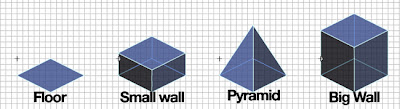
I'm feeling a little less confident about this environment, with only one day to go there are still alot of issues I need to iron out and to be honest Ive got no idea how to fix them.

After spend several more hours trying to get the his test to work, I had achieved little, and was very frustrated. I managed to get the actual hit test working, but couldn't get it to play the movie clip associated with it, it would go to the first frame of that movie clip, but no matter what I did, I just couldn't get it to play! So i couldn't even begin to write the presumably more difficult part of the code, where pressing the duck button avoided this. With time fast running out I'm really not sure I will be able to get it to work, So I have included the "get hit, fall down and get back up again" clip anyway (Space button) so the hours I spent on trying to get it to work wont have been a total loss.
I also fixed the issue I had with the ground movie clip only playing through once in reverse. It now moves back and forwards almost seamlessly.
I had another go at the blocks whizzing around in the background, and felt i pulled them off a lot better this time. I might tidy their timings up a little bit though.
All in all I'm pretty happy with the environment, it just needs a few minor tweaks here and there. ideally I would like to get the hit test - falling over animation working, but with just one day left I think that might be pushing it.
I also fixed the issue I had with the ground movie clip only playing through once in reverse. It now moves back and forwards almost seamlessly.
I had another go at the blocks whizzing around in the background, and felt i pulled them off a lot better this time. I might tidy their timings up a little bit though.
All in all I'm pretty happy with the environment, it just needs a few minor tweaks here and there. ideally I would like to get the hit test - falling over animation working, but with just one day left I think that might be pushing it.
Isometric environment
0.5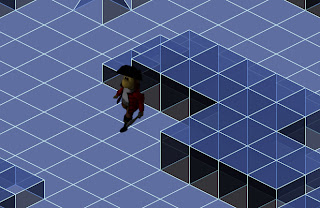
Ive spent a good part of the last two days going over the tutorial I used for this one (written by Tony Pa) some of the code dealing converting the characters placement into isometric is pretty heavy and I don't quite understand it fully. Also I just cant get (!Key.isDown()) to work, So the character refuses to stop playing the walk animation if he is stationary. This has really perplexed me as to why it wont work and have tried just about every thing to fix it, from having 'static' frame in the movie clip and using the gotoAndStop command, to stopping the whole movie clip, and Even stopping the entire _root movie clip, but the (!Key.isDown()) just seems to have no effect.
As I started to get incredibly frustrated with this I decided to move on to something else, I wanted the environment to scroll as you neared the edge like in my side scrolling environment, I messed around with a few ideas, such as moving the entire movie clip if the characters x and y position crossed a specific thresh hold near the edge of the screen, but the once the character was over this thresh hold, the screen would continue to move in this direction(as he is still over thresh hold), even if the character was now moving in the opposite direction. In the end I had to settle for moving the entire movie clip when the corresponding key is pressed, Although this works, it has two major issues . Firstly, because the entire movie clip is constantly changing position, this chews up quite a lot of processing power and seems to slow the file down quite heavily. Secondly, the environment moves at the same speed as the character, so most of the time he stays in the center, but if he hits an un walkable tile, and stops, and you are still pressing the walk key, the environment will continue to move, as its movement is dependant on the key press, not the characters movement, so it is possible, to get the character stuck behind a wall and move the screen until he is out of view.
I made a few new tiles to improve the appearance of the landscape, and made the array a lot bigger so there was at least something to explore.
Ive spent a good part of the last two days going over the tutorial I used for this one (written by Tony Pa) some of the code dealing converting the characters placement into isometric is pretty heavy and I don't quite understand it fully. Also I just cant get (!Key.isDown()) to work, So the character refuses to stop playing the walk animation if he is stationary. This has really perplexed me as to why it wont work and have tried just about every thing to fix it, from having 'static' frame in the movie clip and using the gotoAndStop command, to stopping the whole movie clip, and Even stopping the entire _root movie clip, but the (!Key.isDown()) just seems to have no effect.
As I started to get incredibly frustrated with this I decided to move on to something else, I wanted the environment to scroll as you neared the edge like in my side scrolling environment, I messed around with a few ideas, such as moving the entire movie clip if the characters x and y position crossed a specific thresh hold near the edge of the screen, but the once the character was over this thresh hold, the screen would continue to move in this direction(as he is still over thresh hold), even if the character was now moving in the opposite direction. In the end I had to settle for moving the entire movie clip when the corresponding key is pressed, Although this works, it has two major issues . Firstly, because the entire movie clip is constantly changing position, this chews up quite a lot of processing power and seems to slow the file down quite heavily. Secondly, the environment moves at the same speed as the character, so most of the time he stays in the center, but if he hits an un walkable tile, and stops, and you are still pressing the walk key, the environment will continue to move, as its movement is dependant on the key press, not the characters movement, so it is possible, to get the character stuck behind a wall and move the screen until he is out of view.
I made a few new tiles to improve the appearance of the landscape, and made the array a lot bigger so there was at least something to explore.
I'm feeling a little less confident about this environment, with only one day to go there are still alot of issues I need to iron out and to be honest Ive got no idea how to fix them.
Saturday, September 1, 2007
Project 2 Update
With my side scrolling map coming along nicely, I thought I should post some progress of my Isometric map.
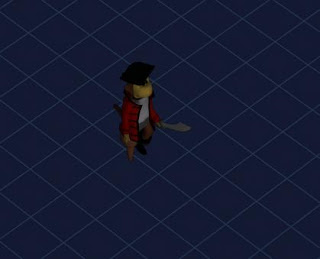
I Rendered out an isometric ground plane, to be placed behind the character in flash. For some reason I had great difficultly getting this to work how I wanted (The map was static and the character moved, when the character nears the edge of the screen, the screen moves too. much like the system I used in my side scrolling version, simple enough right?) After speaking to Kah about this, we eventually got it to work relatively well. unfortunately this little glitch was a sign of things to come..
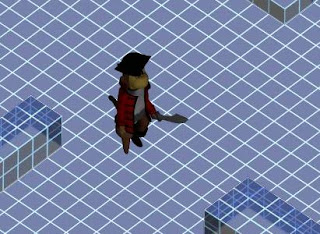
I modeled a more complex environment in 3ds max, I separated this into 3 layers - the ground plane, the edge of the environment, and the shapes and rendered and imported them into flash individually. My plan was to lay these out on the stage, and using the swapDepth command, bringing each element forward or back, depending on where the character was giving the appearance he was moving in front/behind the objects. However after messing around with the code for several hours and going through several online tutorials, I was getting no where, i Just couldn't get the swapDepth command to work properly. At this point I also realised I had no idea how I could get the hit test command to work either, because the blocks where angled, but the movie clips were square, if I used a simple hit test, empty parts of the movie clip that *should* be walkable, would instead block the character.Arrhh!! Everything was going wrong. My attempt the avoid using some tricky array by using pre-rendered movie clips was getting nowhere.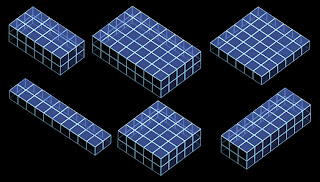
0.1 (click for .swf) 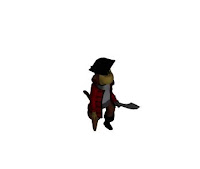
I started off rendering out my characters walk cycle from an isometric view, I rendered out the sequence 4 times, one for each direction of movement (Left, Right, Up, Down) and then imported these files into flash and codded the keys for them.
I started off rendering out my characters walk cycle from an isometric view, I rendered out the sequence 4 times, one for each direction of movement (Left, Right, Up, Down) and then imported these files into flash and codded the keys for them.
I Rendered out an isometric ground plane, to be placed behind the character in flash. For some reason I had great difficultly getting this to work how I wanted (The map was static and the character moved, when the character nears the edge of the screen, the screen moves too. much like the system I used in my side scrolling version, simple enough right?) After speaking to Kah about this, we eventually got it to work relatively well. unfortunately this little glitch was a sign of things to come..
I modeled a more complex environment in 3ds max, I separated this into 3 layers - the ground plane, the edge of the environment, and the shapes and rendered and imported them into flash individually. My plan was to lay these out on the stage, and using the swapDepth command, bringing each element forward or back, depending on where the character was giving the appearance he was moving in front/behind the objects. However after messing around with the code for several hours and going through several online tutorials, I was getting no where, i Just couldn't get the swapDepth command to work properly. At this point I also realised I had no idea how I could get the hit test command to work either, because the blocks where angled, but the movie clips were square, if I used a simple hit test, empty parts of the movie clip that *should* be walkable, would instead block the character.Arrhh!! Everything was going wrong. My attempt the avoid using some tricky array by using pre-rendered movie clips was getting nowhere.
top layer - the blocks

Middle layer - The map edge
 bottom layer - The ground plane
0.4 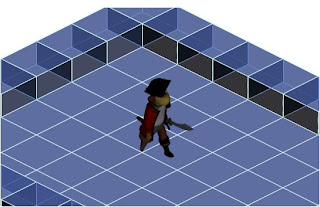
I decided to bite the bullet and throw away my previous idea and just draw the map through code using an array. I found some nice tutorials on isometric tile based games and used one of these as a base for my map. I am slowly getting my head around the code, and have got it working relatively well. Here is the basic environment so far, I am quite happy I managed to recreate most of the aesthetic I had previously achieved with my rendered images.
I decided to bite the bullet and throw away my previous idea and just draw the map through code using an array. I found some nice tutorials on isometric tile based games and used one of these as a base for my map. I am slowly getting my head around the code, and have got it working relatively well. Here is the basic environment so far, I am quite happy I managed to recreate most of the aesthetic I had previously achieved with my rendered images.
Monday, August 27, 2007
Project 2 Mega-Holiday-Update
I realised I hadn't updated the ol' blog in a while, So I thought I better post some updates. I felt it would be easier to show my development by breaking them up into separate 'versions' and explaining each individually, rather than just one big wall of text.
So Here goes..

My first attempt at the code for the environment, When either the left or right arrow key is pressed, the background objects scroll and the ground animation plays, giving the illusion of movement.
I altered the code so now the environment only starts to move when the character nears the edge of the screen. I feel this is a much better result, as now it actually feels like you are moving the character around a space, rather than a scrolling background.
Added a 'midground' and foreground layer of objects, each layer moves at a different speed, to enhance the parallaxing effect.

Added a short background clip of some blocks flying around, its very jumpy because I only rendered out a few frames to test it out. Not really very happy with it to be honest, its quite 'busy' looking and distracts from the foreground, and I don't think the scale is quite right either.

Ditched the background idea after quite a lot of time messing around with particle systems and stuff in max, I liked the concept of lots a blocks whizzing around in the background, but I just couldn't get it to look good in the game, Might have another go at it later though.
I also felt objects in the environment looked quite flat and ruined the realism, My problem was, that if i rendered out the blocks from an angle to show their depth, and then motion tweened this image across the screen, when it got the the other side, and thus was being viewed from the opposite angle, It looked wrong and completely ruined the effect. Originally I wanted to render out each frame of motion for each block as it moved past, but after some quick experiments I realised this would require well over 1000 frames, and increase the file size of the final .swf exponentially.
So in the end I had to stick with my initial idea of just motion tweening a single image across the screen, but through clever use of rounded shapes (such as cylinders and cones) and angling the rectangular shapes carefully, I feel its quite hard to notice the perspective issues. So I'm happy with it.
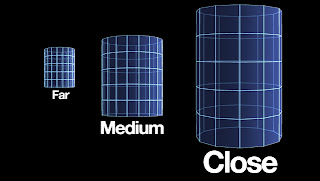
I rendered out each shape three times from different lengths, rather than just resizing one image as i previously did as this also turned out perspectively incorrect.

I had another go at this background, this time using just a simple gradient, fairly happy with the outcome, might add some more detail later though. I also slowed down the speed at which the ground scrolled as it was a little too fast for the character, However this brought up a new problem, when the character stopped moving the jump between the current frame of the Moving ground clip, and the single frame of the static ground image became a lot more noticeable. I fixed this by re writing the code so instead of the ground having 3 separate movie clip states (Backwards, static, forwards) it just had one state (Forward), which played when the character nears the edge, and stops when he moves away, and plays in reverse when he nears the other edge. Simple and it works even better! there is now no jump at all. But.... the clip only seems to play through once in reverse. I couldn't find a proper 'play in reverse' command, i had to use 'Previous frame', which only works until it gets to frame 1. Will try and fix this later if i can work out how.
A few background gradient examples, Although I liked the darker ones better, they made a faint white outline appear around the character so i just when for a simple light gray one.

I was happy with how the environment was coming together visually, but wasn't really any fun to explore. You just pressed either left or right and that was it. So I added another small monkey character who leads you to a goal at one end - A treasure chest. When you reach the chest, a clip of it opening plays and the environment stops scrolling, signalling you have reached 'The end' of the map.
I still felt this was pretty linear and pointless, so i came up with the idea of having to duck some flying blocks along the way. I animated a duck sequence (Down key) and a 'getting hit and falling over then climbing back up' sequence, and tried to get some collision detection working, but didn't have any luck. Will keep at it though.
Phew. That does it for now. Ive also been working on my second file, an isometric map, will post some updates on that later.
Monday, August 13, 2007
Project 2 Update
Over the last couple of days Ive done a few tests at trying to create the aesthetic i am after for the environment, I will begin getting into the code once Ive got the look right. I started by simply taking my basic environment from my previous test and rendering out a wireframe version to get the 'Tron' look I was after. I felt this test was pretty unsuccessful as the end result looked quite messy and the character just didn't fit it, Also the environment was fairly static looking.
I went back to the drawing board and put together another basic wireframe environment, this time with a white background and more opaque to clean it up a little. I wanted to have a go at parallaxing so I animated and rendered a few frames of the ground plane, as well as static frames for each of the cubes. I imported these into flash and using the motion tween, animated the blocks at various speeds to give the illusion they are moving with the background. I felt this test was far more successful, However as the blocks are only a single frame each, they look very flat, I'm not really sure how I can fix this, but i will keep at it.
I also felt my blog was getting a bit messy and it was hard to follow my progress. So Ive started uploading my experiments to youtube, although the quality isn't great they are a bit easier to watch this way, I also uploading a few of my earlier tests and reposted them below.
Here's the previous experiment I did, just testing my character in between a background and foreground layer in flash.
And heres the final 3d walkcycle, compared to my original 2d version.
I went back to the drawing board and put together another basic wireframe environment, this time with a white background and more opaque to clean it up a little. I wanted to have a go at parallaxing so I animated and rendered a few frames of the ground plane, as well as static frames for each of the cubes. I imported these into flash and using the motion tween, animated the blocks at various speeds to give the illusion they are moving with the background. I felt this test was far more successful, However as the blocks are only a single frame each, they look very flat, I'm not really sure how I can fix this, but i will keep at it.
I also felt my blog was getting a bit messy and it was hard to follow my progress. So Ive started uploading my experiments to youtube, although the quality isn't great they are a bit easier to watch this way, I also uploading a few of my earlier tests and reposted them below.
Here's the previous experiment I did, just testing my character in between a background and foreground layer in flash.
And heres the final 3d walkcycle, compared to my original 2d version.
Friday, August 10, 2007
Project 3 Proposal update
I made a quick walk cycle example of how I want sketch boy to look. I rendered out a sequence from 3ds Max, and then drew over each frame in photoshop to create a nice sketchy rotoscoped look.
Sketch boy example
Sketch boy example

Subscribe to:
Posts (Atom)